

Description
Achieve3000 App: Access Literacy Lessons Anytime
Overview
The Achieve3000 App is designed to support K-12 students in developing critical literacy skills through differentiated, standards-aligned lessons. Built for both online and offline use, it enables access to content from the KidBiz3000®, TeenBiz3000®, and Empower3000® platforms. The app supports anytime, anywhere learning, allowing students to engage with reading materials even without an active internet connection. Lessons are automatically synchronized when connectivity is restored, ensuring continuity in learning progress.
Target users include students in elementary through high school, educators managing digital classrooms, and school administrators seeking tools for equitable access to literacy instruction. The app serves as a bridge between mobile and desktop environments, particularly with the new messaging feature that allows students to send video content from mobile lessons to the desktop version for full viewing. This integration supports flexible learning workflows across devices.
Developed by Achieve3000, a provider of online literacy solutions, the app leverages a patented model of differentiated instruction across 12 English and 7 Spanish reading levels. While specific details about the development team or company history were not provided, the product is positioned as a key tool in preparing students for college and career readiness. Real-world usage includes independent study, classroom assignments, and remote learning scenarios where connectivity may be inconsistent.
Key Features & Capabilities
- Offline Lesson Access: Students can view and complete lessons without an internet connection. Progress is saved locally and synced when the device reconnects to the web.
- Video Messaging Between Devices: A new feature in version 4.0.3 allows students to send video content from the mobile app to the desktop version for full-screen viewing, improving accessibility and engagement.
- Article + Activity Lesson Type: The addition of the A+A icon identifies lessons that combine reading with interactive activities, enhancing comprehension and retention.
- After Reading Poll Comments: Supports both online and offline class discussions, enabling students to participate in peer and teacher-led conversations regardless of connectivity.
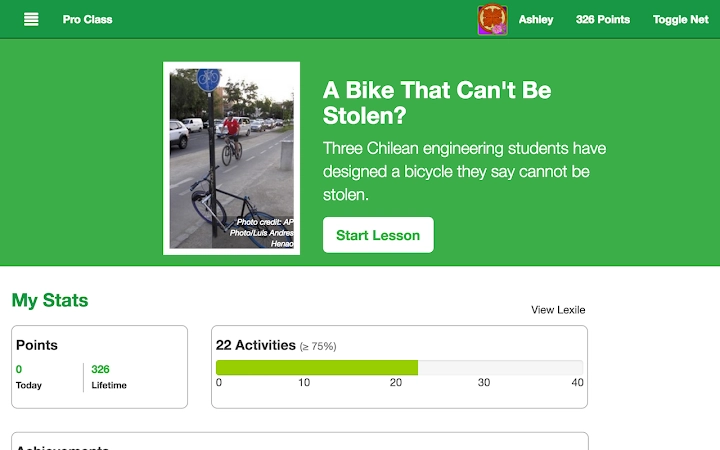
- My Stats Tracking: Displays earned achievements and progress over time, motivating students through gamified learning elements.
- Calendar Views on My Lessons Page: Lessons are organized by date with multiple calendar options, helping students and teachers manage due dates and track completion.
- Accessibility Integration: Fully compatible with iOS accessibility tools, supporting diverse learning needs and inclusive classroom environments.
These features support a dynamic learning experience, particularly in low-bandwidth or remote settings. The ability to send video content between mobile and desktop versions enhances workflow continuity. Teachers can assign lessons with confidence, knowing students can engage regardless of connectivity. The app’s design promotes independent learning while maintaining alignment with state and Common Core standards.
User Interface, Workflow & Performance
The user interface is structured around intuitive navigation, with clear access to lessons, progress tracking, and discussion features. The main dashboard displays upcoming and completed tasks, while the My Lessons page offers multiple calendar views for date-based organization. Navigation between sections is straightforward, minimizing cognitive load for younger users.
Workflow efficiency is enhanced by automatic sync capabilities and offline functionality. Students can begin a lesson on a mobile device and continue it on a desktop without losing progress. The app maintains consistent layout and functionality across Windows and Mac platforms, ensuring a uniform experience regardless of operating system.
Performance details were not specified by the developer. However, based on general software behavior, the app likely manages system resources efficiently given its 140MB installation size. The developer did not provide additional system requirements. Resource usage such as CPU or RAM consumption remains unspecified. Stability is expected to be consistent, as the app supports both online and offline operations with automatic synchronization.
Compatibility & System Requirements
The Achieve3000 App is available for Windows and Mac operating systems. Version 4.0.3 was released on May 15, 2024, and requires 140MB of local storage for installation. The app supports offline use, making it suitable for shared devices in educational environments.
Exact system requirements were not listed. Compatibility information is limited to the operating systems mentioned. The developer did not specify minimum CPU, RAM, or graphics requirements. Hardware requirements are not provided. Users should ensure their devices meet general standards for running modern desktop applications. The app is designed for use with existing Achieve3000 subscriptions, requiring a valid username and password for access.
Pros and Cons
Pros
- Supports offline learning with automatic sync upon reconnection
- Enables cross-device continuity via video messaging between mobile and desktop
- Offers differentiated instruction across 12 English and 7 Spanish reading levels
- Integrates with iOS accessibility tools for inclusive use
- Free to download and use with active subscriptions
- Provides multiple calendar views for better lesson organization
Cons
- Exact system requirements were not provided
- Performance data such as CPU or RAM usage were not specified
- Requires an active Achieve3000 subscription for full functionality
- Limited information on update frequency or release cycle
FAQ Section
Is the Achieve3000 App available for both Windows and Mac?
Yes, the app is compatible with both Windows and Mac operating systems.
Can I use the app without an internet connection?
Yes, the app supports offline access to lessons. Progress is saved locally and synchronized when the device reconnects to the internet.
Is the app secure and safe for student use?
The app is designed for educational environments and requires a valid Achieve3000 login. It does not collect personal data beyond what is necessary for account access and progress tracking.
How often does the app receive updates?
Updates are released as needed, with version 4.0.3 released on May 15, 2024. Specific update frequency was not provided.
Can I use the app on multiple devices?
Yes, students can access their lessons across multiple devices, including mobile and desktop, with progress syncing when online.
Final Thoughts + CTA
The Achieve3000 App delivers a robust, flexible solution for K-12 literacy instruction, particularly in environments with inconsistent internet access. Its ability to support offline learning, cross-device continuity, and differentiated content makes it a valuable tool for educators and students alike. The integration of accessibility features and real-time progress tracking further strengthens its appeal in diverse classroom settings.
While system requirements and performance metrics are not fully detailed, the app’s core functionality remains strong and purpose-built. For schools seeking a free, standards-aligned literacy tool that supports anytime, anywhere learning, this app stands out as a reliable choice.
Download Achieve3000 App now
Guides & Tutorials for Achieve3000 Mobile App for Chrome
How to install Achieve3000 Mobile App for Chrome
- Click the Preview / Download button above.
- Once redirected, accept the terms and click Install.
- Wait for the Achieve3000 Mobile App for Chrome download to finish on your device.
How to use Achieve3000 Mobile App for Chrome
This software is primarily used for its core features described above. Open the app after installation to explore its capabilities.
User Reviews for Achieve3000 Mobile App for Chrome 0
No reviews found





